Hi all,
I’ve spent a long time working with AWS and especially SDB. Loading mass data into SDB is not very frequent, but when needed it often comes to an end : there is no utility to do that and it’s a pain in the neck to use an ETL for that task (IMHO ETLs struggle to load key value stores and other NoSQL stores). Note : in the past, I developed a Kettle plugin to load sdb. You can find the post here.
Fortunately, AWS is providing a very powerful API. So one, two, three, Java … I decided to code my own SDB loader.
What is SDB ?
SDB is a NoSQL – non relational – database. You store data as key-value pairs and you can query data items via web services requests. For more informations, please go on AWS SDB page.
In order to understand SDB data model, we have to define 3 components :
- Domains : you store data in domains. Domains are similar to tables, from the relational world.
- Items : items are unique keys for attributes,
- Attributes and values : attributes are similar to columns. You add values to attributes.
Better than a long speech, below is a representation of a domain. CustomerID is the item and “First name” to “Telephone” are attributes. (example taken from Amazon). To make a simple analogy, a domain is like an Excel spreadsheet.
| CustomerID | First name | Last name | Street address | City | State | Zip | Telephone | |
| 123 | Bob | Smith | 123 Main St | Springfield | MO | 65801 | 222-333-4444 | |
| 456 | James | Johnson | 456 Front St | Seattle | WA | 98104 | 333-444-5555 | |
SDB limitations
SDB has some limitations, the most obvious are :
- 10 Gb per domain,
- 100 domains,
- 256 attributes per item,
- 1024 attribute value length.
You can learn more about SDB limitations here.
What is sdb_loader ?
sdb_loader is built around the “BatchPutAttributesRequest” API method, allowing to insert “chunks” of 25 rows (no more). Usage is very simple. Running sdb_loader requires four files :
- sdb_loader itself,
- a data file containing the data you want to load
- a control file, containing the sdb column names (attributes) and other parameter I will describe later on.
- an AWS credentials file, containing your accessKey and secretKey .
These three files are working together like this :

sdb_loader.jar : the main program. Has to be started with java –jar sdb_loader. You have different parameters to set up, below is the –help output.
data file : any data file. No header row. Usual delimiters canl be used : “;”, “,”, “|” or “\t”. Delimiters detection is automatic. I will add more delimiters if needed.
control file : a simple txt file describing the SDB attributes and a flag specifying whether or not to replace the attribute/value pair or to add a new attribute/value pair. The default setting is false. Note : choosing false can have a significant impact on performance. The values are delimited with a “;”. You don’t have to specify any key (the itemName()) because the loader will automatically use the first column of the data file as the key. So, in the control file, you just have to describe the attributes.
Here is an example of the control file :

And here is an example of a completely silly data file. As you can see, no header and the key (Item_1) is present as first column.
Item_1;Attribute_1;Attribute_1;Attribute_1;Attribute_1;Attribute_1;Attribute_1;Attribute_1;Attribute_1;Attribute_1
Item_2;Attribute_2;Attribute_2;Attribute_2;Attribute_2;Attribute_2;Attribute_2;Attribute_2;Attribute_2;Attribute_2
Item_3;Attribute_3;Attribute_3;Attribute_3;Attribute_3;Attribute_3;Attribute_3;Attribute_3;Attribute_3;Attribute_3
Item_4;Attribute_4;Attribute_4;Attribute_4;Attribute_4;Attribute_4;Attribute_4;Attribute_4;Attribute_4;Attribute_4
Item_5;Attribute_5;Attribute_5;Attribute_5;Attribute_5;Attribute_5;Attribute_5;Attribute_5;Attribute_5;Attribute_5
The command line is also very simple. Here is the –help command :

How to use sdb_loader ?
java -jar sdb_loader.jar --aws-credentials=aws_credentials.txt --control-filename=data_mapping.txt --data-filename=data.txt --domain-name=mass_load_domain --sdb-endpoint=sdb.eu-west-1.amazonaws.com –domainRecreate
Parameters explanation :
- --aws-credentials : the file having your AWS credentials,
- --control-filename : the file having the attributes you want to load and the boolean flag specifying whether or not to replace the attribute/value pair or to add a new attribute/value pair,
- --data-filename : the data file (without header),
- --domain-name : the domain you want to load (domain = table),
- --sdb-endpoint : the endpoint for your sdb instance (eu, us, asia …),
- -domainRecreate : if present, the domain your specified in [—domain-name] will be dropped and re-built, otherwise the domain won’t be altered,
- -help : the help output.
Here is the program output, while running :
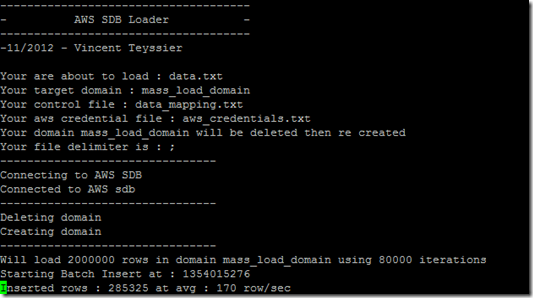
At the end of processing, you should be able to see the whole story :

Performances
SDB query (load or select) performance has a lot to do with bandwidth : loading data from your workstation is a lot slower than loading from EC2. That’s why I recommend to use sdb_Loader from an EC2 instance. Loading from a workstation, using a broadband connection behind a corporate firewall, will give you a 20 to 40 rows/second.
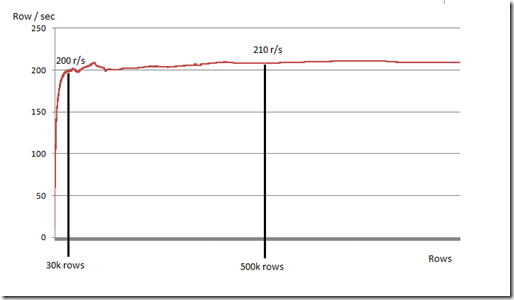
Have a look at the graph below. This data was captured from an EC2 instance running Ubuntu when loading a 10 attributes domain, for +1 million rows. As you can see, we are starting slow then peak performance comes quick and seems to be around 200 rows/second and remain stable over time.
Note that I’ve already had better row/sec, like 270 to 300 row/sec. Depends on time (better in the morning, here in France).
Increase performance with domain sharding
After the interesting reading of “How to efficiently forklift 1 billion rows into SimpleDB”, from Sid Anand’s blog, I found an interesting idea : domain sharding.
You can create several domains (ex : 100), and then pump all your data into sdb domains with several parallel executions of sdb_loader.

Hey, sounds interesting, I want to try it !
No problem, just download the jar here and have fun. You will also find a typical control file and an AWS credential file. The jar is working with java 1.7.
What’s next now ?
If you like or dislike sdb_loader, please let me know. I love having feedback and sharing with people. You can also follow me on Twitter (@vincentteyssier). Of course, feel free to give me any feedback, feature request and/or bug warning.
After the loader, now, I’m starting an extractor. Work is in progress and I have in mind to create a multi threaded extractor (ability to extract from more than a query/domain at a time).
On top of that, I’m currently having a close look to DynamoDB and I will start a loader + extractor in the next coming weeks.


